
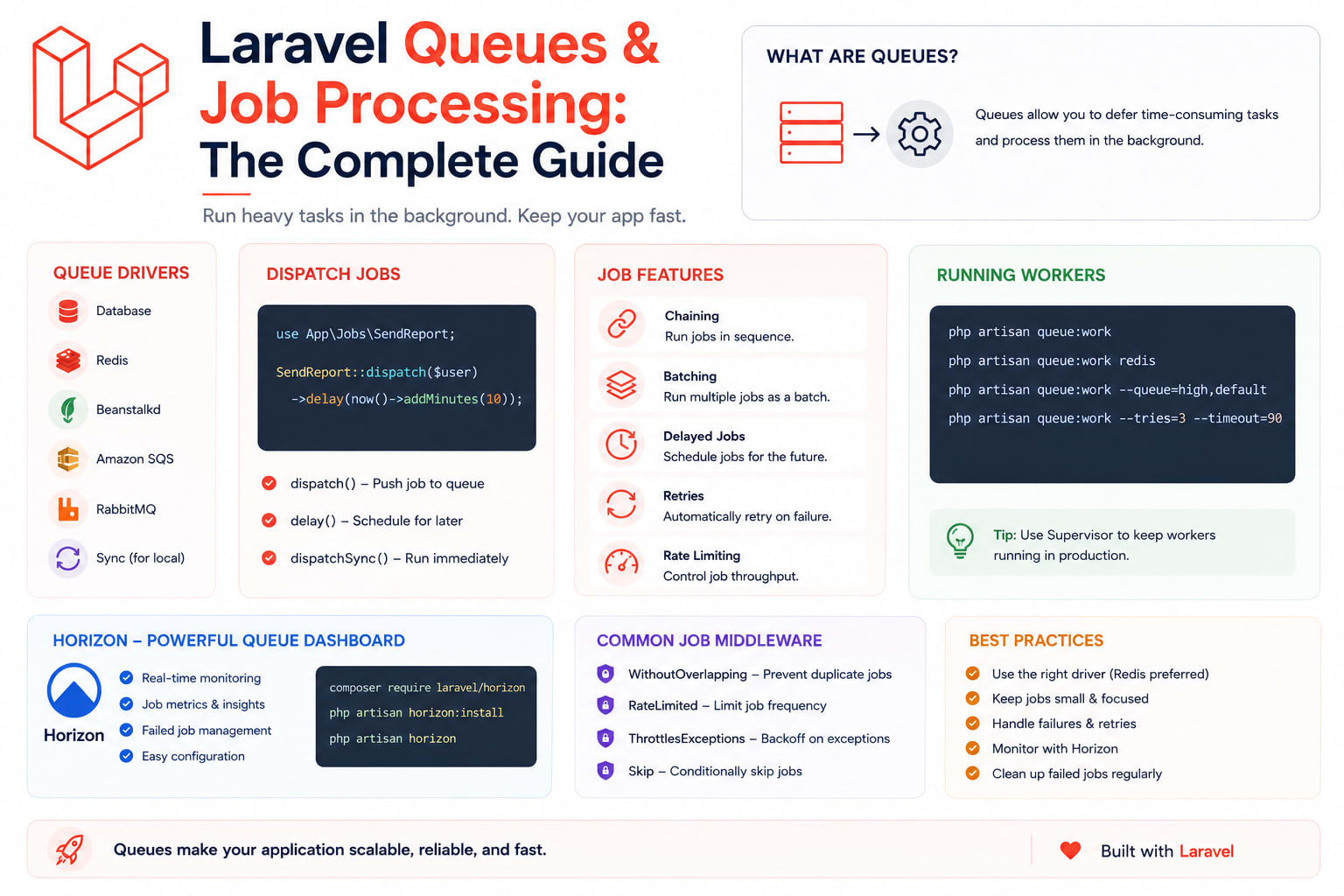
Laravel Queues & Job Processing: The Complete Guide
If a user is waiting on a response while your app sends an email, calls a third-party API, or generates a PDF, you're doing it wrong. Queues exist to move slow work off the request cycle entirely — the user gets an instant response, and the actual work happens in the background. Here's everything from dispatching your first job to running workers reliably in production.
Table of Contents
- Why Queues Exist
- Queue Drivers and Which One to Pick
- Creating and Dispatching a Job
- Delayed Jobs
- Job Chaining
- Job Batching
- Retries, Backoff, and Failed Jobs
- Rate Limiting and Unique Jobs
- Monitoring with Horizon
- Running Workers in Production
- Common Mistakes
- Wrapping Up
1. Why Queues Exist
Any request-response cycle that includes slow work — sending an email, calling a payment gateway, resizing an uploaded image, generating a report — makes the user wait for something they don't need to wait for. Queues decouple "the thing that has to happen" from "the thing the user is watching happen." The HTTP request finishes fast, and a separate worker process picks up the actual job whenever it can.
This isn't just a performance trick — it's also a reliability boundary. If a third-party API is down when a job runs, the job can retry on its own schedule instead of the whole request failing in front of a user.
2. Queue Drivers and Which One to Pick
Laravel supports several queue backends, configured in config/queue.php:
- sync — runs jobs immediately, inline, no actual queueing. Useful only for local development/testing, never for production.
- database — stores jobs in a database table. Simple to set up, fine for low-to-moderate volume, but adds load to your primary database under heavy traffic.
- redis — the most common production choice. Fast, supports delayed jobs and job batching natively, and doesn't compete with your app's database for I/O.
- sqs — AWS's managed queue service. Worth it if you're already deep in AWS infrastructure and want the queue itself to be someone else's uptime problem.
For most production Laravel apps, Redis is the default recommendation unless you have a specific reason to reach for SQS (already AWS-native infrastructure) or need the simplicity of database for a low-traffic app that doesn't want another moving part.
env
QUEUE_CONNECTION=redis
3. Creating and Dispatching a Job
Generate a job class:
bash
php artisan make:job SendWelcomeEmail
php
class SendWelcomeEmail implements ShouldQueue
{
    use Dispatchable, InteractsWithQueue, Queueable, SerializesModels;

    public function __construct(public User $user) {}

    public function handle(): void
    {
        Mail::to($this->user->email)->send(new WelcomeMail($this->user));
    }
}
Dispatch it from anywhere in your app:
php
SendWelcomeEmail::dispatch($user);

// Dispatch to a specific named queue
SendWelcomeEmail::dispatch($user)->onQueue('emails');

// Dispatch to a specific connection (if you run more than one)
SendWelcomeEmail::dispatch($user)->onConnection('redis');
Because the job constructor takes an Eloquent model directly, Laravel serializes just the model's ID and re-fetches a fresh instance from the database when the job actually runs — not a stale snapshot from dispatch time.
4. Delayed Jobs
Push a job to run later instead of as soon as a worker picks it up — useful for reminder emails, trial-expiry notifications, or scheduled follow-ups:
php
SendWelcomeEmail::dispatch($user)->delay(now()->addMinutes(10));

// Or delay based on business logic
SendTrialEndingReminder::dispatch($user)->delay($user->trial_ends_at->subDay());
5. Job Chaining
Chain jobs so each one only runs after the previous one succeeds — useful for a multi-step pipeline where order matters:
php
Bus::chain([
    new ProcessUploadedVideo($upload),
    new GenerateThumbnail($upload),
    new NotifyUserVideoReady($upload),
])->dispatch();
If any job in the chain fails, the remaining jobs in that chain are automatically skipped — you don't get a thumbnail generated for a video that failed to process.
6. Job Batching
Batching is different from chaining — it runs many jobs in parallel and lets you track overall progress, with a callback once everything finishes:
php
$batch = Bus::batch([
    new ImportUsersChunk($chunk1),
    new ImportUsersChunk($chunk2),
    new ImportUsersChunk($chunk3),
])->then(function (Batch $batch) {
    // All jobs completed successfully
})->catch(function (Batch $batch, Throwable $e) {
    // First job failure in the batch
})->finally(function (Batch $batch) {
    // Runs regardless of success or failure
})->dispatch();

// Check progress anywhere
$batch->progress(); // percentage complete
This is the right tool for bulk operations — importing a large CSV in chunks, sending a campaign to thousands of users, reprocessing a big dataset — where you want parallelism plus a single point to check overall status.
7. Retries, Backoff, and Failed Jobs
Define how many times a job should retry and how long to wait between attempts:
php
class SendWelcomeEmail implements ShouldQueue
{
    public $tries = 3;

    public function backoff(): array
    {
        return [10, 30, 60]; // seconds: wait 10s, then 30s, then 60s
    }

    public function failed(Throwable $exception): void
    {
        // Notify yourself, log to an error tracker, alert on Slack — whatever fits
        Log::error('Welcome email permanently failed', ['user' => $this->user->id]);
    }
}
Failed jobs (after exhausting all retries) land in the failed_jobs table by default. Inspect and retry them:
bash
php artisan queue:failed              # list failed jobs
php artisan queue:retry <id>          # retry a specific failed job
php artisan queue:retry all           # retry everything
php artisan queue:forget <id>         # delete a specific failed job record
8. Rate Limiting and Unique Jobs
Throttle how often a job type runs — useful when a job hits a rate-limited third-party API:
php
public function middleware(): array
{
    return [new RateLimited('third-party-api')];
}
Prevent the same logical job from being queued twice while one is already pending — critical for anything triggered by user action that could fire more than once (double-clicking a button, a webhook retry):
php
class ProcessPayment implements ShouldQueue, ShouldBeUnique
{
    public function uniqueId(): string
    {
        return $this->order->id;
    }

    public $uniqueFor = 3600; // seconds the uniqueness lock holds
}
9. Monitoring with Horizon
For Redis-backed queues, Laravel Horizon gives you a dashboard for queue throughput, job runtime, failed job details, and per-queue metrics — without which you're flying blind on what your workers are actually doing.
bash
composer require laravel/horizon
php artisan horizon:install
php artisan horizon
Configure queue priorities and worker counts in config/horizon.php:
php
'environments' => [
    'production' => [
        'supervisor-1' => [
            'connection' => 'redis',
            'queue' => ['high', 'default', 'low'],
            'balance' => 'auto',
            'maxProcesses' => 10,
        ],
    ],
],
balance => 'auto' lets Horizon dynamically shift worker processes toward whichever queue has the most backlog, instead of a fixed split that wastes capacity on quiet queues.
10. Running Workers in Production
php artisan queue:work needs to run continuously in production — and needs to restart itself if it crashes. Use Supervisor to manage this:
ini
; /etc/supervisor/conf.d/laravel-worker.conf
[program:laravel-worker]
process_name=%(program_name)s_%(process_num)02d
command=php /var/www/myapp/artisan queue:work redis --sleep=3 --tries=3 --max-time=3600
autostart=true
autorestart=true
stopasgroup=true
killasgroup=true
user=deployer
numprocs=4
redirect_stderr=true
stdout_logfile=/var/www/myapp/storage/logs/worker.log
stopwaitsecs=3600
bash
sudo supervisorctl reread
sudo supervisorctl update
sudo supervisorctl start laravel-worker:*
--max-time=3600 restarts each worker process every hour — this matters because long-running PHP workers slowly accumulate memory, and a scheduled restart is cheaper than debugging a memory leak. Also remember: every deploy needs php artisan queue:restart, or your workers keep running the old code from before the deploy, silently, until they eventually restart on their own.
11. Common Mistakes
- Using
syncin production — defeats the entire purpose; jobs run inline and block the request exactly like not using a queue at all - Forgetting
queue:restartafter deploys — workers keep executing stale code for however long they stay alive - No
failed()handling — a job silently failing after all retries, with nobody ever finding out, is worse than no retry logic at all - Passing huge payloads into job constructors — pass an ID and re-fetch inside
handle(), not a huge array or collection serialized into the queue payload - Not setting
--max-timeor--max-jobs— long-lived workers can leak memory over days; scheduled restarts are cheap insurance - Treating Horizon as optional — without it, you find out about a stuck queue when a customer complains their email never arrived, not before
12. Wrapping Up
Queues are one of those Laravel features that quietly separates apps that feel fast from apps that don't. The setup cost is small — a driver, a job class, a worker process — and the payoff compounds every time you add one more slow operation that no longer blocks a user's request. Start by moving your slowest current request — usually an email or a third-party API call — into a job, and build from there.